

 Authenticate
 Manage Users
 Customize
 Auth0 AI
 Platform
- Define organization behavior for each API you need to access.
- In cases where the application should only access specific organizations i.e. not all of them, Authorize M2M Access for each API you need to access for those specific organizations.
Define organization behavior
You can configure how your application uses Organizations during the Client Credentials Flow for each API, such as whether the application must use an organization or can access any organization or only explicitly associated ones. The following table explains the fields for defining organization behavior for M2M access:Define organization behavior table
The Allow machine-to-machine access to any organization option is not available for third-party applications. Third-party applications always require an explicit organization client grant per Organization. To learn more, read Enable Third-Party Application Access for an Organization.
Define organization behavior for an application
To define organization behavior for an application, use the Auth0 Dashboard or Management API.- Auth0 Dashboard
- Management API
For a machine-to-machine application, define organization behavior via the Auth0 Dashboard:
- Navigate to Auth0 Dashboard > Applications, and select the application for which you want to configure Organizations.
- Switch to the APIs tab and expand the
client_grantdetails for the API you wish to configure access to. - Configure the appropriate settings as explained in the Define organization behavior table.
- Select Save.
- Navigate to Auth0 Dashboard > APIs, and select the API for which you want to configure Organizations access.
- Switch to the Machine To Machine Applications tab. It shows all applications, not just Machine-to-Machine applications. Locate your application.
- To authorize access, click the toggle for your application. Then, click your application to expand the configuration details.
- Configure the appropriate settings as explained in the Define organization behavior table.
- Select Save.
Set default organization
Some clients do not support non-standard fields in the Client Credentials Flow. Therefore, they cannot send the requiredorganization parameter to the /oauth/token endpoint. For these clients, you can set a default organization that is automatically applied to any Client Credentials request from the application when none is specified and organization support is required by the API.
Default organization is applied when
organization_usage=require for the API (i.e. target audience).Set default organization table
Set default organization for an application
To set the default organization for an application, use the Auth0 Dashboard or Management API.- Auth0 Dashboard
- Management API
To enable a default organization for an application via the Auth0 Dashboard: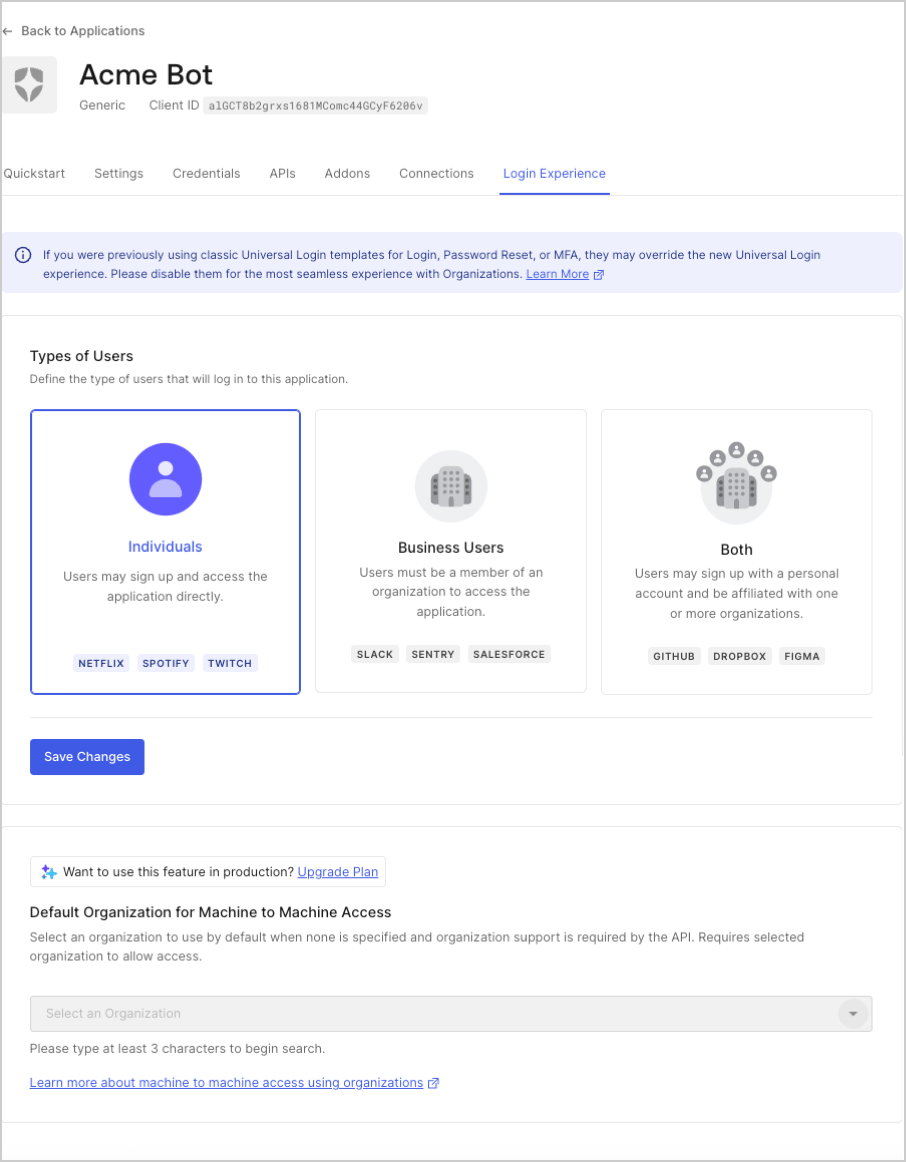
- Navigate to Auth0 Dashboard > Applications, and select the application for which you want to configure.
- Select the Organizations tab.
- Configure the appropriate settings as explained in the Set default organization table.
- Click Save.