> ## Documentation Index
> Fetch the complete documentation index at: https://docs-dev-feat-universal-portals.mintlify.site/llms.txt
> Use this file to discover all available pages before exploring further.

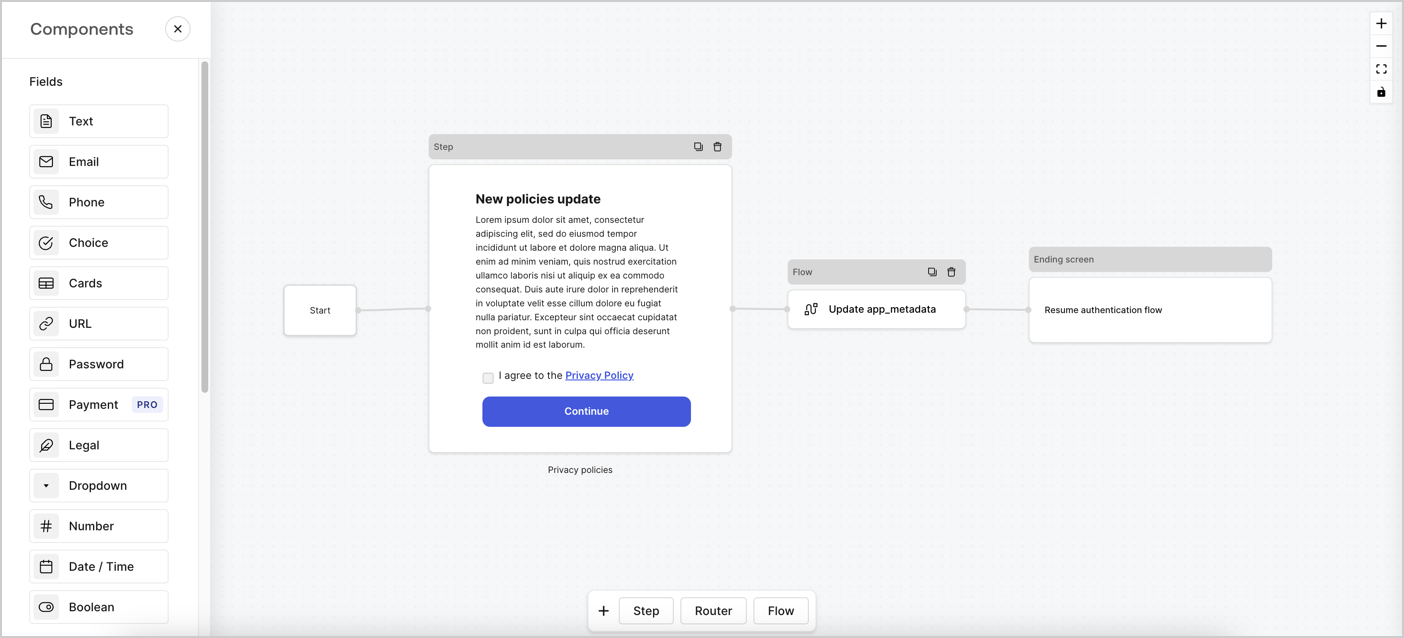
> Learn how to configure an update policy form using Forms for Actions for users to review and accept new terms of service or consent updates.

# Use Cases: Configure an update policy form using Forms

<Card title="Before you start">
  1. Create a [Machine-to-Machine Application](/docs/get-started/auth0-overview/create-applications/machine-to-machine-apps) with the following scopes enabled:

  * `read:users`
  * `update:users`
  * `create:users`
  * `read:users_app_metadata`
  * `update:users_app_metadata`
  * `create:users_app_metadata`

  2. Add a [Vault connection](/docs/customize/forms/vault) using the M2M application credentials.
</Card>

Forms for Actions allows you to create custom privacy policies flows and store the consent under the `app_metadata` object.
<Frame>
  <img src="https://mintcdn.com/docs-dev-feat-universal-portals/aXicSPuVMH4nZNJb/docs/images/cdy7uua7fh8z/6i68dMvHDTijfRmSgN1x8Q/ad900e7d4c0fb34645921435472b8684/privavy-policy-form.png?fit=max&auto=format&n=aXicSPuVMH4nZNJb&q=85&s=6a4bf703e76a830c33087a374a2532df" alt="Dashboard > Actions > Forms > Privacy policy use case" data-og-width="1404" width="1404" data-og-height="638" height="638" data-path="docs/images/cdy7uua7fh8z/6i68dMvHDTijfRmSgN1x8Q/ad900e7d4c0fb34645921435472b8684/privavy-policy-form.png" data-optimize="true" data-opv="3" srcset="https://mintcdn.com/docs-dev-feat-universal-portals/aXicSPuVMH4nZNJb/docs/images/cdy7uua7fh8z/6i68dMvHDTijfRmSgN1x8Q/ad900e7d4c0fb34645921435472b8684/privavy-policy-form.png?w=280&fit=max&auto=format&n=aXicSPuVMH4nZNJb&q=85&s=df8e7efc33f112b8ba5aab6e3ff3ef40 280w, https://mintcdn.com/docs-dev-feat-universal-portals/aXicSPuVMH4nZNJb/docs/images/cdy7uua7fh8z/6i68dMvHDTijfRmSgN1x8Q/ad900e7d4c0fb34645921435472b8684/privavy-policy-form.png?w=560&fit=max&auto=format&n=aXicSPuVMH4nZNJb&q=85&s=caef821aec39e18ecfaf7b4d59866493 560w, https://mintcdn.com/docs-dev-feat-universal-portals/aXicSPuVMH4nZNJb/docs/images/cdy7uua7fh8z/6i68dMvHDTijfRmSgN1x8Q/ad900e7d4c0fb34645921435472b8684/privavy-policy-form.png?w=840&fit=max&auto=format&n=aXicSPuVMH4nZNJb&q=85&s=c87277f85887a3906c0cf7e55c81681d 840w, https://mintcdn.com/docs-dev-feat-universal-portals/aXicSPuVMH4nZNJb/docs/images/cdy7uua7fh8z/6i68dMvHDTijfRmSgN1x8Q/ad900e7d4c0fb34645921435472b8684/privavy-policy-form.png?w=1100&fit=max&auto=format&n=aXicSPuVMH4nZNJb&q=85&s=d6866a37e5161255ec9e79f8588fe9d9 1100w, https://mintcdn.com/docs-dev-feat-universal-portals/aXicSPuVMH4nZNJb/docs/images/cdy7uua7fh8z/6i68dMvHDTijfRmSgN1x8Q/ad900e7d4c0fb34645921435472b8684/privavy-policy-form.png?w=1650&fit=max&auto=format&n=aXicSPuVMH4nZNJb&q=85&s=d127c8e050e4df2e16b2e8eda7fc31f4 1650w, https://mintcdn.com/docs-dev-feat-universal-portals/aXicSPuVMH4nZNJb/docs/images/cdy7uua7fh8z/6i68dMvHDTijfRmSgN1x8Q/ad900e7d4c0fb34645921435472b8684/privavy-policy-form.png?w=2500&fit=max&auto=format&n=aXicSPuVMH4nZNJb&q=85&s=156b7f21c3f79f1f8c97a164a7c09d67 2500w" />
</Frame>

The sections below outline how you can create an Update Policy form using nodes and flows, along with steps for adding your form to a [Post Login](/docs/customize/actions/explore-triggers/signup-and-login-triggers/login-trigger) Action.

## Create a form from scratch

Follow these steps to create a form to gather information:

1. Open the Form editor by selecting **Auth0 Dashboard > Actions > Forms.**
2. Select **Create Form** > **Start from scratch**.

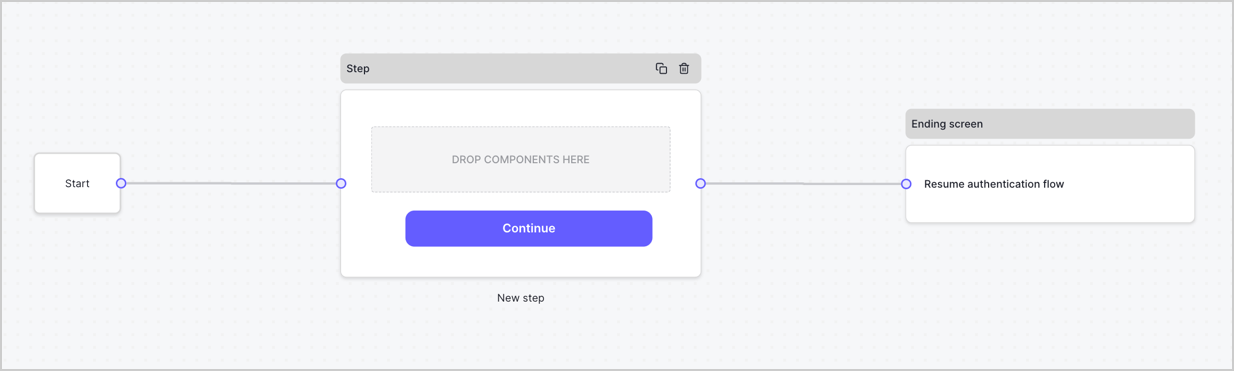
By default, a new form contains a Start node, a Step node, and an Ending screen node.
<Frame>
  <img src="https://mintcdn.com/docs-dev-feat-universal-portals/BXNgi9DOOBlxcudi/docs/images/cdy7uua7fh8z/2TZ9jSjgEcARFpULI6hz4R/a4319a1bd482f2ee5cc23100fdb2f42c/New-form-Forms-for-action-use-case.png?fit=max&auto=format&n=BXNgi9DOOBlxcudi&q=85&s=8d7d02ea5620326d9f30fb05fd02d0f7" alt="Dashboard > Forms > Use Cases > Form" data-og-width="1234" width="1234" data-og-height="371" height="371" data-path="docs/images/cdy7uua7fh8z/2TZ9jSjgEcARFpULI6hz4R/a4319a1bd482f2ee5cc23100fdb2f42c/New-form-Forms-for-action-use-case.png" data-optimize="true" data-opv="3" srcset="https://mintcdn.com/docs-dev-feat-universal-portals/BXNgi9DOOBlxcudi/docs/images/cdy7uua7fh8z/2TZ9jSjgEcARFpULI6hz4R/a4319a1bd482f2ee5cc23100fdb2f42c/New-form-Forms-for-action-use-case.png?w=280&fit=max&auto=format&n=BXNgi9DOOBlxcudi&q=85&s=09364d61db96e2b3d5c4eb783f7e1adf 280w, https://mintcdn.com/docs-dev-feat-universal-portals/BXNgi9DOOBlxcudi/docs/images/cdy7uua7fh8z/2TZ9jSjgEcARFpULI6hz4R/a4319a1bd482f2ee5cc23100fdb2f42c/New-form-Forms-for-action-use-case.png?w=560&fit=max&auto=format&n=BXNgi9DOOBlxcudi&q=85&s=eabf04b5885092eb52427f26775957d1 560w, https://mintcdn.com/docs-dev-feat-universal-portals/BXNgi9DOOBlxcudi/docs/images/cdy7uua7fh8z/2TZ9jSjgEcARFpULI6hz4R/a4319a1bd482f2ee5cc23100fdb2f42c/New-form-Forms-for-action-use-case.png?w=840&fit=max&auto=format&n=BXNgi9DOOBlxcudi&q=85&s=2ea06c7b49b91b9a2e2312ecd6747a9a 840w, https://mintcdn.com/docs-dev-feat-universal-portals/BXNgi9DOOBlxcudi/docs/images/cdy7uua7fh8z/2TZ9jSjgEcARFpULI6hz4R/a4319a1bd482f2ee5cc23100fdb2f42c/New-form-Forms-for-action-use-case.png?w=1100&fit=max&auto=format&n=BXNgi9DOOBlxcudi&q=85&s=785aecaa6dfcfe1878be052cd1f959e8 1100w, https://mintcdn.com/docs-dev-feat-universal-portals/BXNgi9DOOBlxcudi/docs/images/cdy7uua7fh8z/2TZ9jSjgEcARFpULI6hz4R/a4319a1bd482f2ee5cc23100fdb2f42c/New-form-Forms-for-action-use-case.png?w=1650&fit=max&auto=format&n=BXNgi9DOOBlxcudi&q=85&s=56be4fe9a1d9fc14280ca25e2d51e715 1650w, https://mintcdn.com/docs-dev-feat-universal-portals/BXNgi9DOOBlxcudi/docs/images/cdy7uua7fh8z/2TZ9jSjgEcARFpULI6hz4R/a4319a1bd482f2ee5cc23100fdb2f42c/New-form-Forms-for-action-use-case.png?w=2500&fit=max&auto=format&n=BXNgi9DOOBlxcudi&q=85&s=6f1e9fc37b3abd42ba76970700d59e56 2500w" />
</Frame>

### Configure the Step node

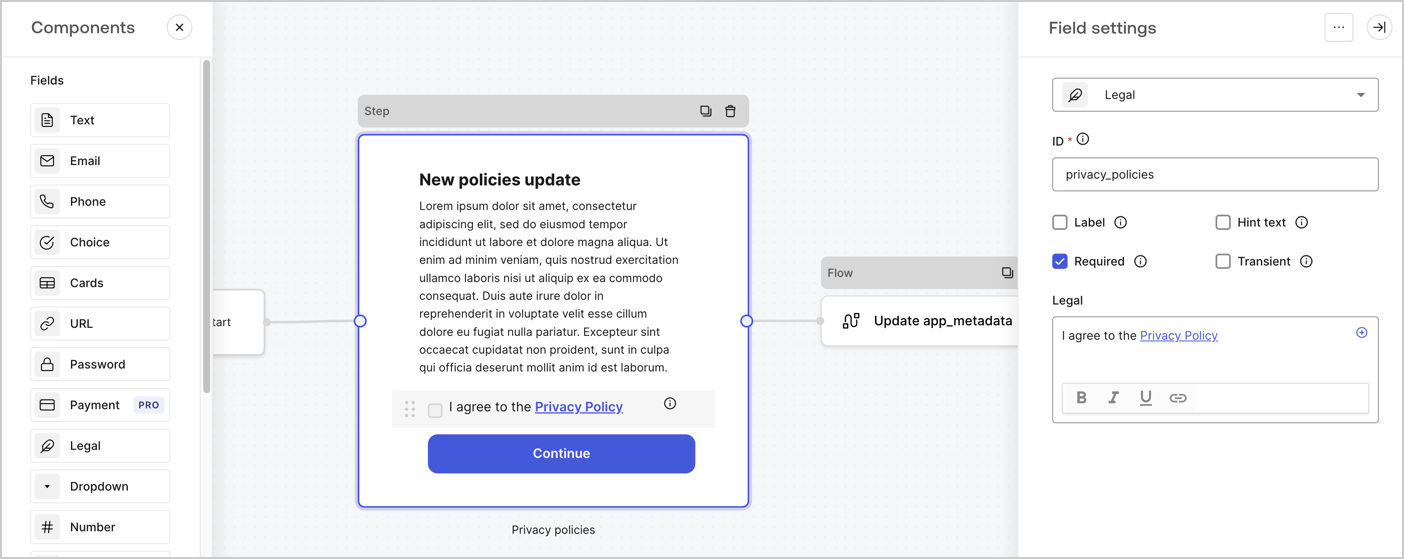
The Step node is the graphical interface visible to users. Add [Fields](/docs/customize/forms/nodes-and-components) to the Step node to collect the new agreement acceptance value by following these steps:

1. Drag a **Rich text** field from the **Components menu** into the **Step** node.

   * **Rich text**: Enter a description of your privacy policies updates.
   * Select **Save**.
2. Drag a **Legal** field into the **Step** node.

   * **ID**: Enter `privacy_policies`.
   * **Required**: Enable the checkbox.
   * **Legal**: Enter `I agree to the Privacy Policy`.
   * Select **Save**.
3. Select **Publish** to save.
<Frame>
  <img src="https://mintcdn.com/docs-dev-feat-universal-portals/5dgM5mhJuvWz0qYy/docs/images/cdy7uua7fh8z/59zFFjQjAnjogkc2QGIqqJ/0ad66b1b636544122aa4e65968b76c2c/privacy-policy-step-node.png?fit=max&auto=format&n=5dgM5mhJuvWz0qYy&q=85&s=eb43a0ba39207fc3d28e16ebcddf9991" alt="Dashboard > Actions > Forms > Use case privacy policy step node" data-og-width="1404" width="1404" data-og-height="559" height="559" data-path="docs/images/cdy7uua7fh8z/59zFFjQjAnjogkc2QGIqqJ/0ad66b1b636544122aa4e65968b76c2c/privacy-policy-step-node.png" data-optimize="true" data-opv="3" srcset="https://mintcdn.com/docs-dev-feat-universal-portals/5dgM5mhJuvWz0qYy/docs/images/cdy7uua7fh8z/59zFFjQjAnjogkc2QGIqqJ/0ad66b1b636544122aa4e65968b76c2c/privacy-policy-step-node.png?w=280&fit=max&auto=format&n=5dgM5mhJuvWz0qYy&q=85&s=a31cb8256cc2ce3d8041a8ebb8b7f4c2 280w, https://mintcdn.com/docs-dev-feat-universal-portals/5dgM5mhJuvWz0qYy/docs/images/cdy7uua7fh8z/59zFFjQjAnjogkc2QGIqqJ/0ad66b1b636544122aa4e65968b76c2c/privacy-policy-step-node.png?w=560&fit=max&auto=format&n=5dgM5mhJuvWz0qYy&q=85&s=b44da8aa58286405eb470643665970c2 560w, https://mintcdn.com/docs-dev-feat-universal-portals/5dgM5mhJuvWz0qYy/docs/images/cdy7uua7fh8z/59zFFjQjAnjogkc2QGIqqJ/0ad66b1b636544122aa4e65968b76c2c/privacy-policy-step-node.png?w=840&fit=max&auto=format&n=5dgM5mhJuvWz0qYy&q=85&s=4e03dcb5b0bbfa3e0e24c3be04f0a905 840w, https://mintcdn.com/docs-dev-feat-universal-portals/5dgM5mhJuvWz0qYy/docs/images/cdy7uua7fh8z/59zFFjQjAnjogkc2QGIqqJ/0ad66b1b636544122aa4e65968b76c2c/privacy-policy-step-node.png?w=1100&fit=max&auto=format&n=5dgM5mhJuvWz0qYy&q=85&s=bcbf310d9423a8b7964865e4d93ac659 1100w, https://mintcdn.com/docs-dev-feat-universal-portals/5dgM5mhJuvWz0qYy/docs/images/cdy7uua7fh8z/59zFFjQjAnjogkc2QGIqqJ/0ad66b1b636544122aa4e65968b76c2c/privacy-policy-step-node.png?w=1650&fit=max&auto=format&n=5dgM5mhJuvWz0qYy&q=85&s=21dece27a981ee7a264a143fff01d164 1650w, https://mintcdn.com/docs-dev-feat-universal-portals/5dgM5mhJuvWz0qYy/docs/images/cdy7uua7fh8z/59zFFjQjAnjogkc2QGIqqJ/0ad66b1b636544122aa4e65968b76c2c/privacy-policy-step-node.png?w=2500&fit=max&auto=format&n=5dgM5mhJuvWz0qYy&q=85&s=5c393214803260851accf31ed56c4804 2500w" />
</Frame>

### Configure the Flow node

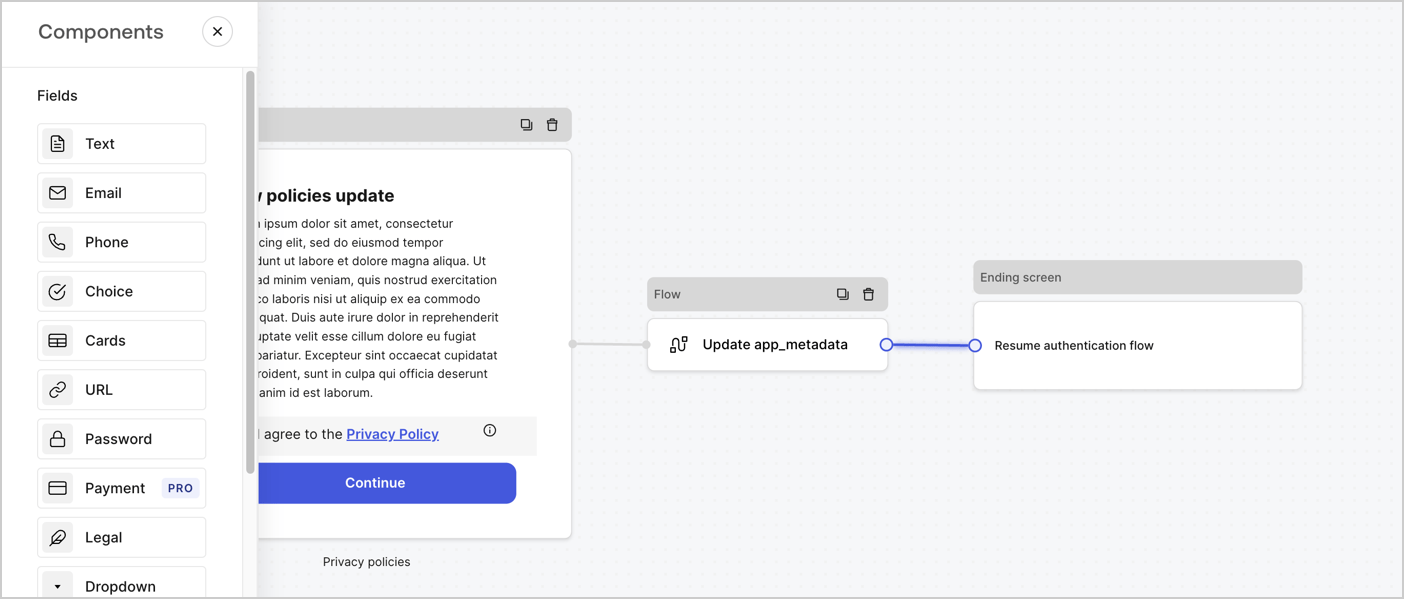
Add a **Flow** node after the **Step** node to update the `app_metadata` and resume the authentication flow by following these steps:

1. Select **Flow** from the bottom of the Form editor.
2. Remove the existing link between the **Step** and **Ending Screen** nodes.
3. Select the new **Flow** > **Click to add a flow** > **Create a new flow.**

   * Enter `Update app_metadata` in the **Name** field.
   * Select **Create**.
   * Select **Save**.
4. Link the **Flow** node to the **Step** and **Ending Screen** nodes as pictured below.
5. Select **Publish** to save.
<Frame>
  <img src="https://mintcdn.com/docs-dev-feat-universal-portals/aXicSPuVMH4nZNJb/docs/images/cdy7uua7fh8z/6YIkzm7SrpM9LW76AXuRzh/353c518fe82bbaa440836da1d83596d6/link-policies.png?fit=max&auto=format&n=aXicSPuVMH4nZNJb&q=85&s=a4c050ae6b807443a9d140bcc13000dc" alt="Dashboard > Actions > Forms > Form" data-og-width="1404" width="1404" data-og-height="599" height="599" data-path="docs/images/cdy7uua7fh8z/6YIkzm7SrpM9LW76AXuRzh/353c518fe82bbaa440836da1d83596d6/link-policies.png" data-optimize="true" data-opv="3" srcset="https://mintcdn.com/docs-dev-feat-universal-portals/aXicSPuVMH4nZNJb/docs/images/cdy7uua7fh8z/6YIkzm7SrpM9LW76AXuRzh/353c518fe82bbaa440836da1d83596d6/link-policies.png?w=280&fit=max&auto=format&n=aXicSPuVMH4nZNJb&q=85&s=89e503ca3cd92c993531bd62f8559b85 280w, https://mintcdn.com/docs-dev-feat-universal-portals/aXicSPuVMH4nZNJb/docs/images/cdy7uua7fh8z/6YIkzm7SrpM9LW76AXuRzh/353c518fe82bbaa440836da1d83596d6/link-policies.png?w=560&fit=max&auto=format&n=aXicSPuVMH4nZNJb&q=85&s=9ed8fdc3c6dd80e7ca6adc0ce1c03843 560w, https://mintcdn.com/docs-dev-feat-universal-portals/aXicSPuVMH4nZNJb/docs/images/cdy7uua7fh8z/6YIkzm7SrpM9LW76AXuRzh/353c518fe82bbaa440836da1d83596d6/link-policies.png?w=840&fit=max&auto=format&n=aXicSPuVMH4nZNJb&q=85&s=0f8b4dac07ea24af3f74e82734444a89 840w, https://mintcdn.com/docs-dev-feat-universal-portals/aXicSPuVMH4nZNJb/docs/images/cdy7uua7fh8z/6YIkzm7SrpM9LW76AXuRzh/353c518fe82bbaa440836da1d83596d6/link-policies.png?w=1100&fit=max&auto=format&n=aXicSPuVMH4nZNJb&q=85&s=d8ca0ed6d0355ad8169cf7fe401b9683 1100w, https://mintcdn.com/docs-dev-feat-universal-portals/aXicSPuVMH4nZNJb/docs/images/cdy7uua7fh8z/6YIkzm7SrpM9LW76AXuRzh/353c518fe82bbaa440836da1d83596d6/link-policies.png?w=1650&fit=max&auto=format&n=aXicSPuVMH4nZNJb&q=85&s=4b5763775bf42d4b5bd7b75d9a1e5b29 1650w, https://mintcdn.com/docs-dev-feat-universal-portals/aXicSPuVMH4nZNJb/docs/images/cdy7uua7fh8z/6YIkzm7SrpM9LW76AXuRzh/353c518fe82bbaa440836da1d83596d6/link-policies.png?w=2500&fit=max&auto=format&n=aXicSPuVMH4nZNJb&q=85&s=993f37bfa352098a26fe36451c28a01a 2500w" />
</Frame>

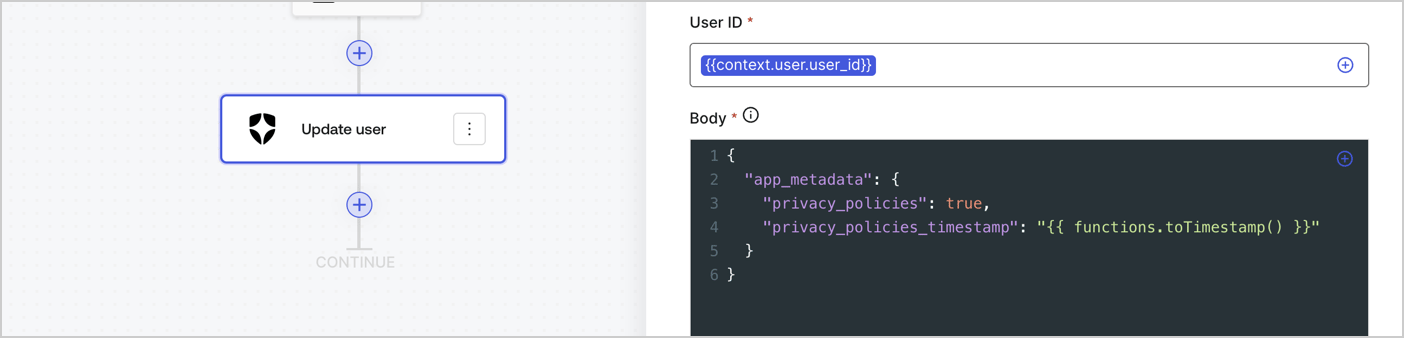
Add an Auth0 Update user action to the flow by following these steps:

1. Select the **Flow** **Update app\_metadata** > **Edit flow** to open the Flow editor in a new tab.
2. Below the StartAction, select the **+** icon to add an **Update user** action. Complete the fields below, then select **Save** to continue.

   * **Connection**: Select from the dropdown the Vault connection to your M2M application.

   * **User ID**: Enter `{{context.user.user_id}}`.

   * **Body**: Copy and paste the following code to update the app\_metadata with the privacy\_policies and privacy\_policies\_timestamp properties.

     ```text lines theme={null}
     {
       "app_metadata": {
         "privacy_policies": true,
         "privacy_policies_timestamp": "{{ functions.toTimestamp() }}"
       }
     }
     ```

   * Select **Save**.
3. Select **Publish** to save.
<Frame>
  <img src="https://mintcdn.com/docs-dev-feat-universal-portals/f4ioMOTSox_QnSMb/docs/images/cdy7uua7fh8z/CvMNIwWrOUwaFW4X3G28p/1fb70ae57a20749d9ffaaba8dc0b7e26/update-user-privacy.png?fit=max&auto=format&n=f4ioMOTSox_QnSMb&q=85&s=eaa4ae37c5e2ce31edf7935d1dbb0437" alt="Dashboard > Actions > Forms > User case privacy policy code" data-og-width="1404" width="1404" data-og-height="338" height="338" data-path="docs/images/cdy7uua7fh8z/CvMNIwWrOUwaFW4X3G28p/1fb70ae57a20749d9ffaaba8dc0b7e26/update-user-privacy.png" data-optimize="true" data-opv="3" srcset="https://mintcdn.com/docs-dev-feat-universal-portals/f4ioMOTSox_QnSMb/docs/images/cdy7uua7fh8z/CvMNIwWrOUwaFW4X3G28p/1fb70ae57a20749d9ffaaba8dc0b7e26/update-user-privacy.png?w=280&fit=max&auto=format&n=f4ioMOTSox_QnSMb&q=85&s=26f745c7f38fc597fb99186666d2cb68 280w, https://mintcdn.com/docs-dev-feat-universal-portals/f4ioMOTSox_QnSMb/docs/images/cdy7uua7fh8z/CvMNIwWrOUwaFW4X3G28p/1fb70ae57a20749d9ffaaba8dc0b7e26/update-user-privacy.png?w=560&fit=max&auto=format&n=f4ioMOTSox_QnSMb&q=85&s=a95988a047b1a55b7be4486148395a44 560w, https://mintcdn.com/docs-dev-feat-universal-portals/f4ioMOTSox_QnSMb/docs/images/cdy7uua7fh8z/CvMNIwWrOUwaFW4X3G28p/1fb70ae57a20749d9ffaaba8dc0b7e26/update-user-privacy.png?w=840&fit=max&auto=format&n=f4ioMOTSox_QnSMb&q=85&s=f33911a77fb513636cfc6dfa1fc0ad43 840w, https://mintcdn.com/docs-dev-feat-universal-portals/f4ioMOTSox_QnSMb/docs/images/cdy7uua7fh8z/CvMNIwWrOUwaFW4X3G28p/1fb70ae57a20749d9ffaaba8dc0b7e26/update-user-privacy.png?w=1100&fit=max&auto=format&n=f4ioMOTSox_QnSMb&q=85&s=aae43a73d6af692fcf5befacf48facd7 1100w, https://mintcdn.com/docs-dev-feat-universal-portals/f4ioMOTSox_QnSMb/docs/images/cdy7uua7fh8z/CvMNIwWrOUwaFW4X3G28p/1fb70ae57a20749d9ffaaba8dc0b7e26/update-user-privacy.png?w=1650&fit=max&auto=format&n=f4ioMOTSox_QnSMb&q=85&s=b855d4ebe8efb1f98cbb6b90741c96fb 1650w, https://mintcdn.com/docs-dev-feat-universal-portals/f4ioMOTSox_QnSMb/docs/images/cdy7uua7fh8z/CvMNIwWrOUwaFW4X3G28p/1fb70ae57a20749d9ffaaba8dc0b7e26/update-user-privacy.png?w=2500&fit=max&auto=format&n=f4ioMOTSox_QnSMb&q=85&s=e61b01e999bac60cbd3892202a19f17f 2500w" />
</Frame>

<Callout icon="file-lines" color="#0EA5E9" iconType="regular">
  The flow **Update app\_metadata** adds a `privacy_policies true` value to the app`_metadata` object and also generates a timestamp with a [helper function.](/docs/customize/forms/variables)
</Callout>

## Retrieve the form render code

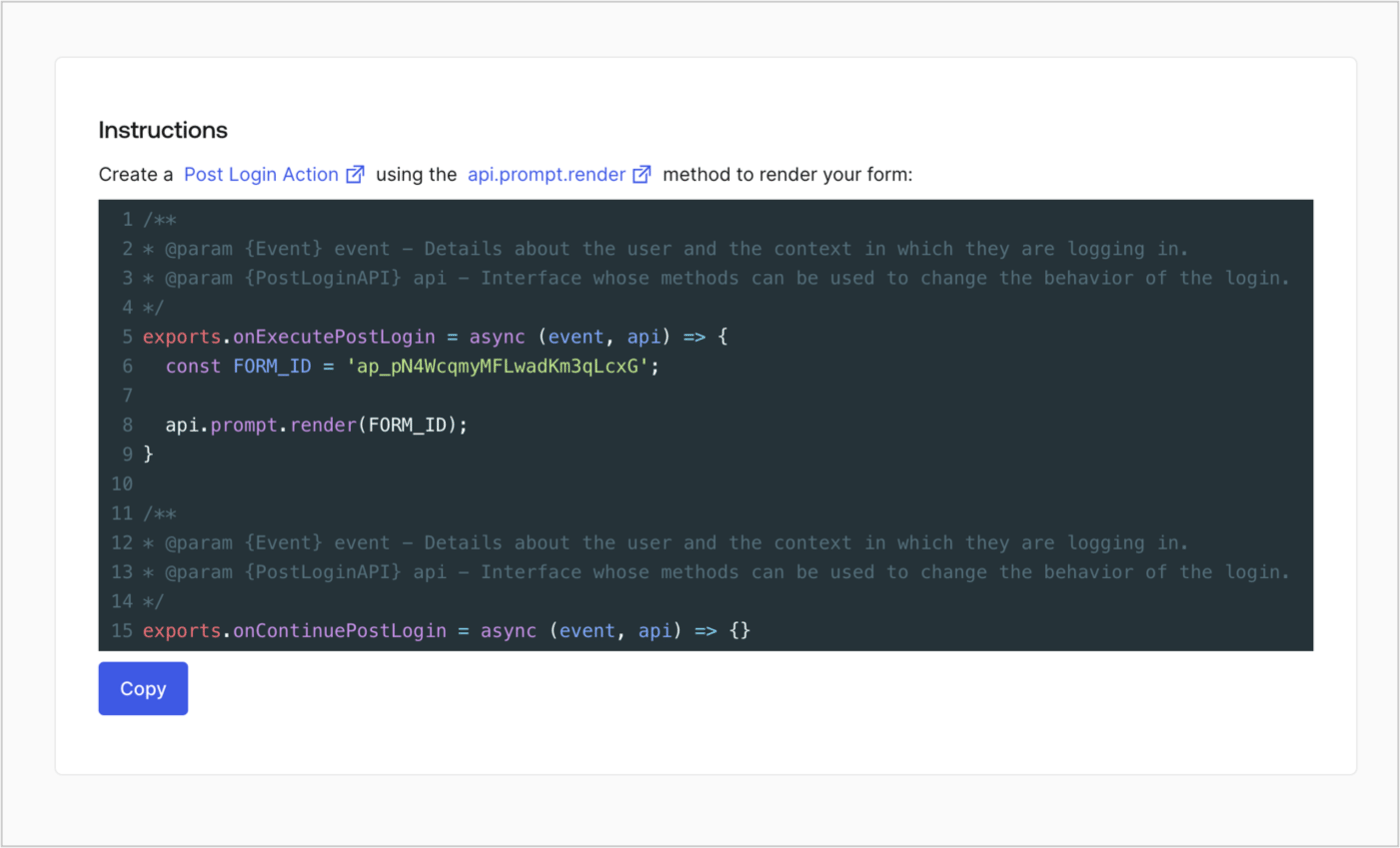
Retrieve your form render code to visually render the form with a custom Post Login Action by following these steps:

* From the Form editor, select **`<> Render`**.
* Select **Copy**.
<Frame>
  <img src="https://mintcdn.com/docs-dev-feat-universal-portals/tUlrAhc8uNlib9ue/docs/images/cdy7uua7fh8z/2EIUzc539sq9lwoTKbjoJv/496a864c0fc44a782c9cadca119dbfb0/embed.png?fit=max&auto=format&n=tUlrAhc8uNlib9ue&q=85&s=9cd8c6a4b04adb86634df1d31deac69a" alt="Dashboard > Actions > Forms > Form > Embed" data-og-width="1400" width="1400" data-og-height="848" height="848" data-path="docs/images/cdy7uua7fh8z/2EIUzc539sq9lwoTKbjoJv/496a864c0fc44a782c9cadca119dbfb0/embed.png" data-optimize="true" data-opv="3" srcset="https://mintcdn.com/docs-dev-feat-universal-portals/tUlrAhc8uNlib9ue/docs/images/cdy7uua7fh8z/2EIUzc539sq9lwoTKbjoJv/496a864c0fc44a782c9cadca119dbfb0/embed.png?w=280&fit=max&auto=format&n=tUlrAhc8uNlib9ue&q=85&s=0048b70f1f3273fd882962622e712491 280w, https://mintcdn.com/docs-dev-feat-universal-portals/tUlrAhc8uNlib9ue/docs/images/cdy7uua7fh8z/2EIUzc539sq9lwoTKbjoJv/496a864c0fc44a782c9cadca119dbfb0/embed.png?w=560&fit=max&auto=format&n=tUlrAhc8uNlib9ue&q=85&s=88e57e687f28c84730c56bbfbdc45744 560w, https://mintcdn.com/docs-dev-feat-universal-portals/tUlrAhc8uNlib9ue/docs/images/cdy7uua7fh8z/2EIUzc539sq9lwoTKbjoJv/496a864c0fc44a782c9cadca119dbfb0/embed.png?w=840&fit=max&auto=format&n=tUlrAhc8uNlib9ue&q=85&s=c526f5167208960548bc5d92c81f04f4 840w, https://mintcdn.com/docs-dev-feat-universal-portals/tUlrAhc8uNlib9ue/docs/images/cdy7uua7fh8z/2EIUzc539sq9lwoTKbjoJv/496a864c0fc44a782c9cadca119dbfb0/embed.png?w=1100&fit=max&auto=format&n=tUlrAhc8uNlib9ue&q=85&s=dc72ad489c3abcb8a6ae850720b5f844 1100w, https://mintcdn.com/docs-dev-feat-universal-portals/tUlrAhc8uNlib9ue/docs/images/cdy7uua7fh8z/2EIUzc539sq9lwoTKbjoJv/496a864c0fc44a782c9cadca119dbfb0/embed.png?w=1650&fit=max&auto=format&n=tUlrAhc8uNlib9ue&q=85&s=0e7d2697b13ce597340f84a8cdd509b4 1650w, https://mintcdn.com/docs-dev-feat-universal-portals/tUlrAhc8uNlib9ue/docs/images/cdy7uua7fh8z/2EIUzc539sq9lwoTKbjoJv/496a864c0fc44a782c9cadca119dbfb0/embed.png?w=2500&fit=max&auto=format&n=tUlrAhc8uNlib9ue&q=85&s=9d154dce4396126c231583cf56a46f5c 2500w" />
</Frame>

## Create a Post Login Action

Create a post-login Action to render your form by following these steps:

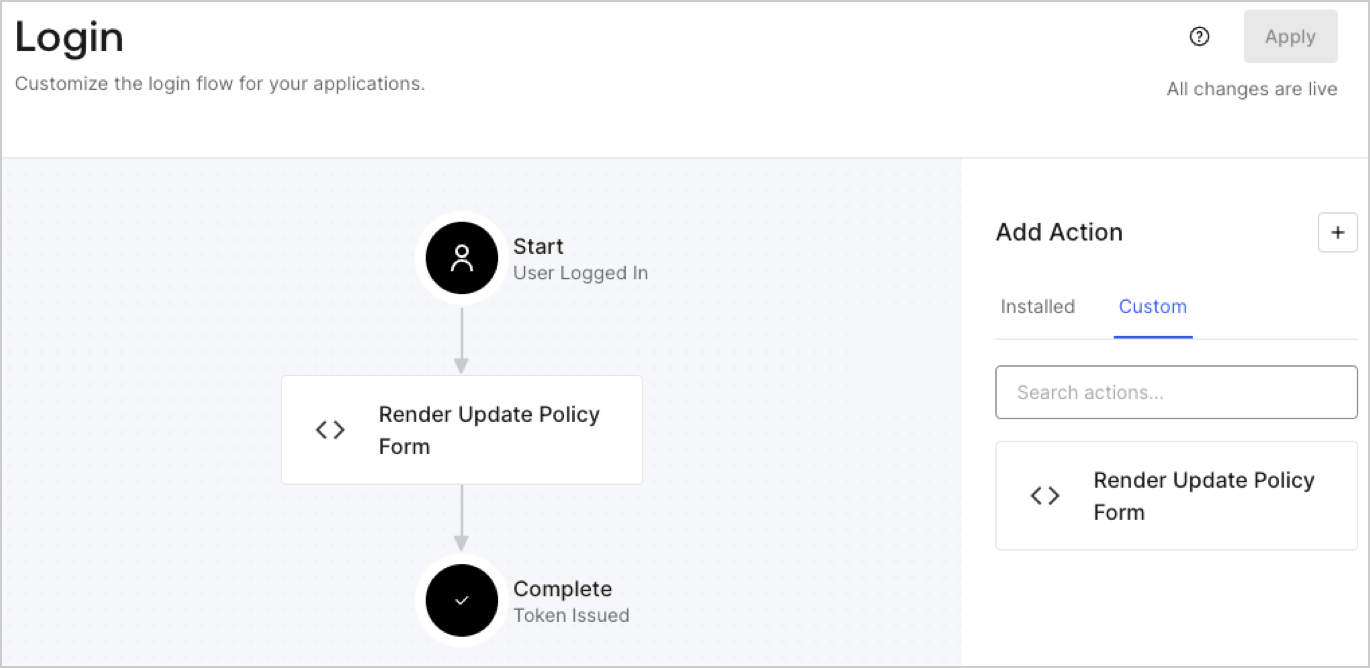
1. Navigate to **Auth0 Dashboard > Actions > Flows > Login.**
2. Select the **+** icon and Select **Build from scratch**:

   * **Name**: Enter `Render Update Policy Form`.
   * **Trigger**: Select `Login / Post Login`.
   * **Runtime**: Select the recommended version.
3. Select **Create**.

To configure the post-login Action:

1. Delete the existing code from the Code editor.
2. Paste the form render code into the Code editor.
3. Edit the code to define the conditional logic that will render the form.

   ```javascript lines theme={null}
   /**
   * @param {Event} event - Details about the user and the context in which they are logging in.
   * @param {PostLoginAPI} api - Interface whose methods can be used to change the behavior of the login.
   */
   exports.onExecutePostLogin = async (event, api) => {
     const FORM_ID = 'REPLACE_WITH_YOUR_FORM_ID';

     if (event.user.app_metadata.privacy_policies !== true) {
       api.prompt.render(FORM_ID);
     }
   }

   exports.onContinuePostLogin = async (event, api) => { }
   ```

   <Callout icon="file-lines" color="#0EA5E9" iconType="regular">
     The example code above will render the form when a user is missing the app metadata `privacy_policies` property.
   </Callout>
4. Select **Deploy.**
5. Drag and Drop the **Render Update Policy Form** Action to the **Login** flow.
   <Frame>
     <img src="https://mintcdn.com/docs-dev-feat-universal-portals/71j9RBfEC4mISt49/docs/images/cdy7uua7fh8z/5TOwDgevZsBqd7yZynUYWU/41ca909dc3007aed4f40ff794a05efa5/postlogin.png?fit=max&auto=format&n=71j9RBfEC4mISt49&q=85&s=fe60d56a50ce107843d167e96db972c2" alt="Dashboard > Forms > Use Case > Render update policy form login action" data-og-width="1370" width="1370" data-og-height="668" height="668" data-path="docs/images/cdy7uua7fh8z/5TOwDgevZsBqd7yZynUYWU/41ca909dc3007aed4f40ff794a05efa5/postlogin.png" data-optimize="true" data-opv="3" srcset="https://mintcdn.com/docs-dev-feat-universal-portals/71j9RBfEC4mISt49/docs/images/cdy7uua7fh8z/5TOwDgevZsBqd7yZynUYWU/41ca909dc3007aed4f40ff794a05efa5/postlogin.png?w=280&fit=max&auto=format&n=71j9RBfEC4mISt49&q=85&s=753252cadabfa8ae53a02c29dd53faf4 280w, https://mintcdn.com/docs-dev-feat-universal-portals/71j9RBfEC4mISt49/docs/images/cdy7uua7fh8z/5TOwDgevZsBqd7yZynUYWU/41ca909dc3007aed4f40ff794a05efa5/postlogin.png?w=560&fit=max&auto=format&n=71j9RBfEC4mISt49&q=85&s=7dda27ef9472c9a65658f4c889f64c81 560w, https://mintcdn.com/docs-dev-feat-universal-portals/71j9RBfEC4mISt49/docs/images/cdy7uua7fh8z/5TOwDgevZsBqd7yZynUYWU/41ca909dc3007aed4f40ff794a05efa5/postlogin.png?w=840&fit=max&auto=format&n=71j9RBfEC4mISt49&q=85&s=bff73ec1526b60616f329bd3232df487 840w, https://mintcdn.com/docs-dev-feat-universal-portals/71j9RBfEC4mISt49/docs/images/cdy7uua7fh8z/5TOwDgevZsBqd7yZynUYWU/41ca909dc3007aed4f40ff794a05efa5/postlogin.png?w=1100&fit=max&auto=format&n=71j9RBfEC4mISt49&q=85&s=c3ede10de856302464c337fd97cb2780 1100w, https://mintcdn.com/docs-dev-feat-universal-portals/71j9RBfEC4mISt49/docs/images/cdy7uua7fh8z/5TOwDgevZsBqd7yZynUYWU/41ca909dc3007aed4f40ff794a05efa5/postlogin.png?w=1650&fit=max&auto=format&n=71j9RBfEC4mISt49&q=85&s=ac38e8057e157089be0916dc8a1d355e 1650w, https://mintcdn.com/docs-dev-feat-universal-portals/71j9RBfEC4mISt49/docs/images/cdy7uua7fh8z/5TOwDgevZsBqd7yZynUYWU/41ca909dc3007aed4f40ff794a05efa5/postlogin.png?w=2500&fit=max&auto=format&n=71j9RBfEC4mISt49&q=85&s=59642f8ec1b0b70524b96c3f738166ba 2500w" />
   </Frame>
6. Select **Apply.**

### Test implementation

Test the implementation by following these steps:

1. Log in with an existing user whose app`_metadata` attribute `privacy_policies` does not have a value.
2. The post-login Action in the Login flow will render the form and prompt for acceptance.
3. Select **Auth0 Dashboard > User Management > Users,** locate the user and verify that the `app_metadata` attribute `privacy_policies` contains a `true` value and a timestamp.
